 Français
  English
  Deutsch
  Italiano
  Español
 Dictadoc Server
Medical dictation for your practice, on a server you own
Dictadoc Server brings voice dictation to every workstation in your organisation. It runs on a single computer on your premises, so nothing you dictate ever leaves your network.
- From 5 to 50 workstations, or more on request
- Fully encrypted
- No internet needed on workstations
How it works
One server, every workstation
Install Dictadoc Server once, on one computer. Every workstation in your organisation can then dictate, with no special hardware.
The server does the work
Dictadoc Server runs on a dedicated computer on your premises and transcribes for everyone.
Workstations stay light
Each computer gets a lightweight app that installs in minutes. An ordinary office PC is all it needs.
Your data stays with you
Voice and text travel only between your workstations and your server. Nothing goes out to the internet.
Privacy and security
Private by design
There is no cloud between your practitioners and their reports. Everything happens inside your own network.
Everything stays on your network
Voice and text go from the workstation to your server and back. Nothing is sent to the internet, or to us.
Nothing is kept
Recordings are processed in memory and never written to the server. Its activity history never contains what was dictated.
Fully encrypted
Everything exchanged between workstations and the server is encrypted, and so is everything stored, on the server and on each workstation.
Only your workstations
A workstation joins with a code from your administrator, and it will only ever talk to your server.
Access you control
Remove a workstation in one click. Its seat is freed straight away, and it stops dictating within 15 minutes.
Works without internet
A server with no internet access at all has every feature. The licence can be activated offline too.
Responsibilities
Your data stays yours
Dictadoc is a dictation and transcription tool. It is not a medical device. It makes no diagnosis, calculates no dosage and plays no part in clinical decisions. You review and approve everything it writes.
Dictadoc Server runs on your premises, on hardware you choose and secure. As with your patient software, your organisation remains responsible for that computer, its network and the health data it processes.
We develop the software. We host nothing, and your patients' data never passes through us.
Why a server
One server instead of ten installations
For a practitioner working alone, the Dictadoc app is the right choice. As your team grows, a server makes everything simpler.
One installation per computer
A licence and a full installation on each
Dictadoc Server
One server, shared seats
For practitioners
Every feature, on every workstation
A light workstation is not a limited one. Your practitioners get the full Dictadoc app, with the same shortcuts and the same settings.
-
A dictation key that types straight into your patient software
-
A floating panel that stays on top
-
Text that appears as you speak
-
Medical vocabulary in five languages
-
Formatting, from raw text to a finished report
-
Punctuation by voice
-
Your reports, with search
-
Playback, import and export of dictations
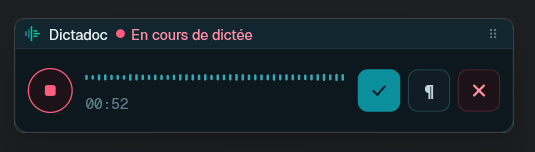
Dictate without leaving the patient record
Press a key to start and again to finish, and the text appears where your cursor was. The floating panel stays on top of your patient software, with nothing to install on its side.
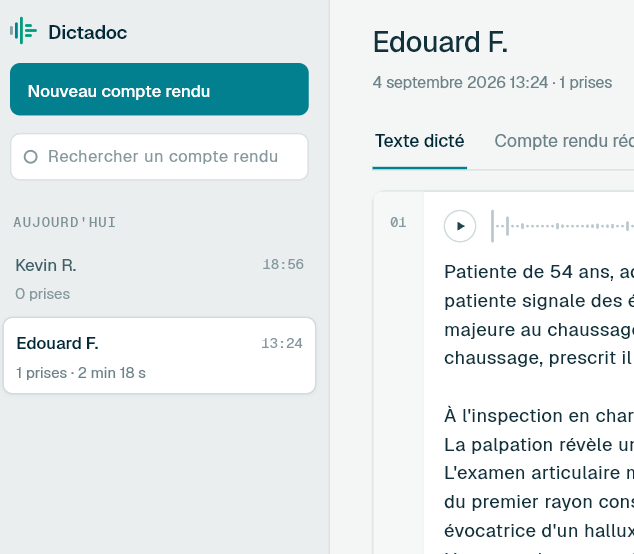
Reports stay with each practitioner
Reports are saved on the practitioner's own workstation, encrypted and visible only to them. The server transcribes and keeps nothing.
Administration
One simple page to run it all
Manage Dictadoc Server from a browser on your network. There's nothing to install.
- Seats in use and seats available
- Your licence and its expiry date
- The access code for new workstations
- Every workstation, with its version
- Recent activity
- Server health, in plain language
You choose what's offered
You decide what is installed on the server and what your workstations can use.
Updates when you decide
Nothing installs by itself. The server delivers updates to its own workstations, and you choose whether practitioners see them.
Discreet by default
To check for a new version, the server sends its version number and nothing else. You can turn this check off.
Tech specs
What you need
Hardware is not included in the licence. Here is what to plan for your server and your workstations.
- Server
- A dedicated computer, switched on all day, that nobody uses as a desktop
- Processor
- 6 cores
- Memory
- 12 GB
- Storage
- 40 GB available
- Graphics card
- Optional. With an 8 GB graphics card, two people can comfortably dictate at the same time, and three with a 12 GB card; without one, expect one at a time.
Your practitioners rarely all dictate at the same moment. Take 15 practitioners who each see 3 patients an hour and dictate for 2 minutes per patient. Each one dictates 6 minutes an hour, a tenth of an 8-hour day. On average, 1.5 people are dictating at any given moment, and a 12 GB card handles twice that. Four or more people dictate at the same time only about 5% of the time; the last one keeps recording, and their text arrives a little later. For 15 practitioners, this card is very likely enough.
Supported cards
- Turing GeForce RTX 20, GTX 16, T4
- Ampere GeForce RTX 30, A10, A40, A100
- Ada Lovelace GeForce RTX 40, L4, L40S
Any card from these three generations works, including the server models. Not supported yet: GeForce RTX 50, GeForce GTX 10, H100.
- Network
- A fixed address on your local network
- Workstations
- Windows 10 or 11, or macOS 12 or later, no graphics card needed
You provide and set up the hardware. Our support answers your questions.
Your organisation buys the computer, installs Dictadoc Server and looks after its network. Our support answers your IT team's questions by e-mail.
Pricing
One licence for your whole organisation
Choose the number of workstations you need. A seat is a workstation, not a person, and you can reassign it whenever you like.
No commitment and no automatic renewal
50 workstations
For larger organisations. Need more than 50 workstations, or several servers? Contact us
Every licence includes
- Every feature, with no paid extras
- Updates for the server and the workstations
- One year from activation, with no automatic renewal
Support
By e-mail, with an answer within 72 working hours.
- Hardware not included.
- By buying, you accept our terms of sale and licence.
What 50 workstations cost
To dictate comfortably, the Dictadoc app needs a graphics card in every computer. With Dictadoc Server, only the server needs one, and your current office PCs are enough.
50 Dictadoc apps
- 50 PCs with a graphics card
- ≈ 50 000 €
- 50 licences, per year
- ≈ 1 000 €
- Total over 1 year
- ≈ 51 000 €
- Total over 5 years
- ≈ 55 000 €
Dictadoc Server, 50 workstations
- One server with three 12 GB graphics cards
- ≈ 4 000 €
- Your current office PCs
- 0 €
- 50-workstation licence, per year
- 6 990 € excl. VAT
- Total over 1 year
- ≈ 11 000 €
- Total over 5 years
- ≈ 39 000 €
Over the years, you will probably need to replace your computers, and these totals leave that out. Replacing 50 PCs with graphics cards costs far more than replacing one server.
Within 5 years, Dictadoc and other dictation tools will likely have changed a lot. A Dictadoc Server licence lasts one year, with no commitment and no automatic renewal: each year, you decide whether to continue.
Estimates for Windows workstations. Hardware prices vary by model.
Setup
Up and running in an afternoon
About 30 minutes for the server, then 5 minutes per workstation.
- 1
Prepare a computer
A dedicated computer with a fixed address on your network.
- 2
Install Dictadoc Server
Choose the administrator password, then let the server download what it needs, once for everyone.
- 3
Activate your licence
It is tied to your server. Your year starts on activation, not on the invoice date.
- 4
Connect your workstations
The same app and the same access code on every computer.
Then dictate a sentence from a workstation. When the text appears, you're ready.
FAQ
Your questions, answered
What happens if the server stops?
Practitioners keep recording. Each dictation waits in line and is transcribed as soon as the server is back. Nothing is lost, and nobody has to dictate again.
How many people can dictate at the same time?
It depends on your server. With an 8 GB graphics card, two people can comfortably dictate at the same time, and three with a 12 GB card; without one, expect one at a time. Further dictations wait their turn, which is barely noticeable for recorded reports and more so when everyone uses live text.
Do workstations need a graphics card?
No. A workstation records and shows the text, and the server does the transcription. Any ordinary office computer running Windows 10 or 11, or macOS 12 or later, will do.
Do workstations need internet access?
No. Workstations only talk to your server, including for their updates. The server can run without internet too: we then provide the licence and everything it needs.
A practitioner leaves. What happens to their seat?
Remove their workstation from the administration page. The seat is freed immediately, and the computer stops dictating within 15 minutes. The workstation stays in the history, so you can see when its access ended.
How is this different from the €19.99 Dictadoc licence?
The Dictadoc app covers one computer that does everything itself, so it has to be powerful enough. It's the right choice for a practitioner working alone. Dictadoc Server covers a whole team: one server, as many workstations as your licence allows, and seats you can reassign.
What happens when the licence expires?
Nothing is deleted. Existing workstations keep dictating for two weeks, so a late renewal never interrupts a consultation. No new workstation can join during that time. As soon as you renew, everything carries on as before.
What about GDPR?
Health data stays within your organisation, and you remain its sole controller, just as you are for your patient software. We host nothing, receive nothing and have no access to your server.
Which computer should we use for the server?
A dedicated computer on your premises that meets the tech specs above. Contact us before you buy hardware and we'll help you choose for the size of your team.
Let's find the right setup for you
Tell us how many workstations you need and how your team works today. We'll help you decide whether Dictadoc Server is right for you, before you commit to anything.
Working on your own? The Dictadoc app, at €19.99 a year, is made for you. Discover Dictadoc