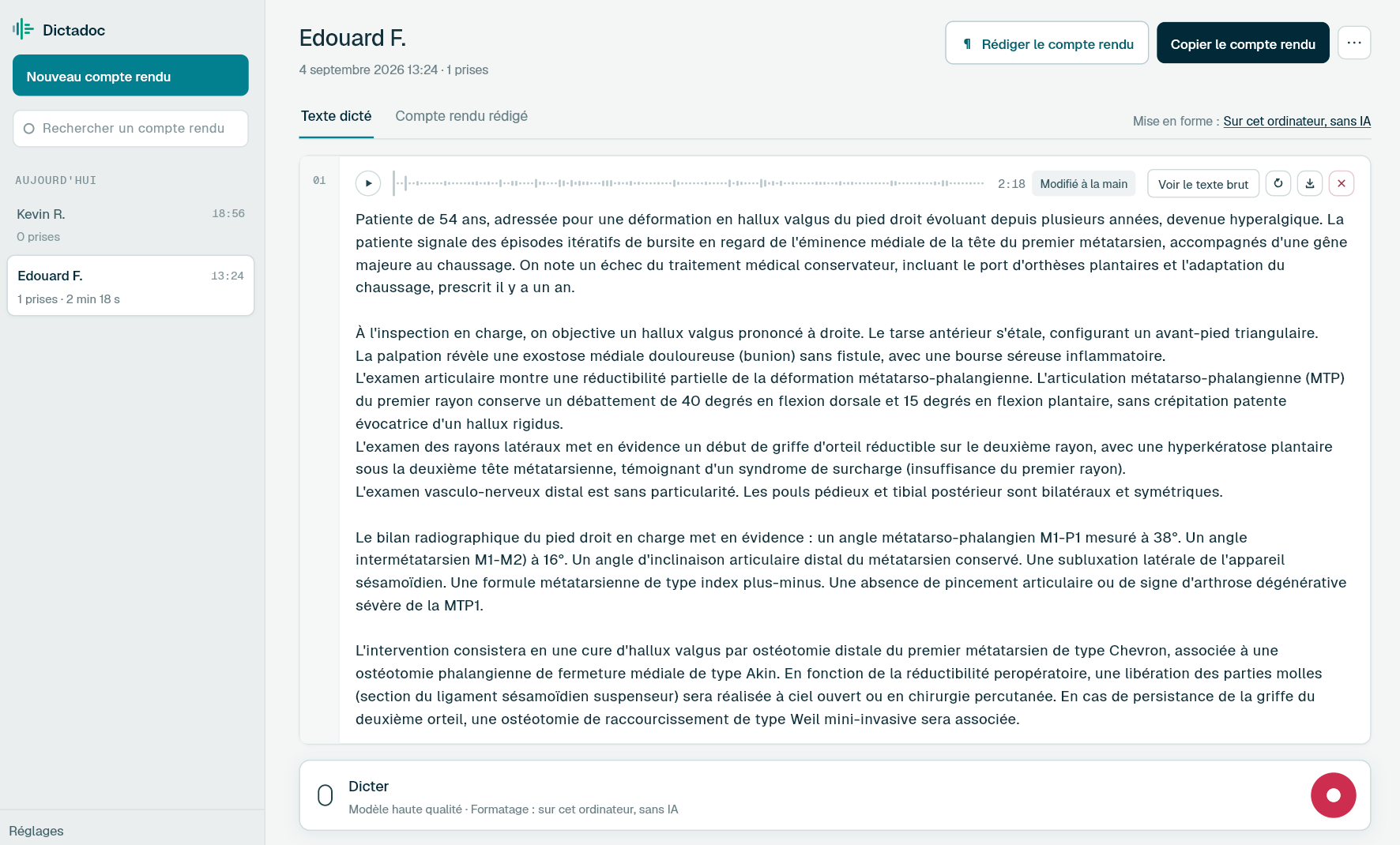
Dictate the antenatal appointment into the record, the postnatal visit once you are back from the home visit and the referral letter between two appointments. Dictadoc transcribes on your computer and, once you allow it, types the text wherever your cursor is.
Care for one woman runs over months, and every stage leaves a written record. The notes are short but many, and they get written between appointments.
The booking appointment
Medical, obstetric and family history, social situation, weight, blood pressure and the plan of care. The longest appointment of the pregnancy, and the one you go back to at every later stage.
The antenatal appointment
Blood pressure, symphysis-fundal height, fetal heart, fetal movements, recent results and the plan. A note at every appointment, and a letter to the obstetric team or the GP when care is shared.
The postnatal visit
At home, in the days after leaving hospital: uterus, perineum or wound, feeding, the mother's mood, the baby's weight and jaundice. The note is often written later, back at base.
The referral letter
To the obstetric team, the GP or the infant feeding team, when something needs another opinion: a raised blood pressure, a baby losing weight, low mood. It draws on earlier notes as well as today's findings.
Day to day
What takes time between two appointments
Dictating without leaving the woman's record
Today
The record is open during the appointment. To dictate, you switch to another application, start recording, then come back and paste the text in the right place. So the note gets typed by hand, or put off until clinic is over.
With Dictadoc
Choose a dictation key, then let Dictadoc write into other applications. In the record, press your key, dictate the examination, then press it again. The transcribed text arrives where the cursor is, and you never leave the record.
Dictation key
Text typed into the field
Measurements at every visit
Today
Care is recorded in figures: fundal height at the antenatal appointment, then birth weight, today's weight and weight loss at the postnatal visit. A general dictation tool often writes them in words, and you retype them one by one.
With Dictadoc
With "Numbers, units and dosages" on, "three thousand two hundred and forty grams" is written "3240 g", "twenty-nine centimetres" becomes "29 cm" and "two point four per cent" becomes "2.4%". Working out the weight loss is still up to you: Dictadoc writes what you dictate.
Numbers, units and dosages
Finding the booking notes weeks later
Today
The booking history matters again at 28 weeks, at 36 weeks and at the birth. Voice notes on a phone carry a date and a time, not a name: to find one woman's booking, you listen to several.
With Dictadoc
Unless you change the setting, Dictadoc keeps your reports, encrypted on the disk and listed by day. Give the booking a title you will recognise, then type a few letters of it into the search: it looks at titles and ignores accents and capitals.
Report library
Encrypted retention
Dictation example
A postnatal visit, dictated back at base
Home visit on day 5 after the birth.
What you say
Mother [new line] uterus involuting well [comma] lochia normal [full stop] perineum healing well [comma] sutures intact [full stop] mood good [comma] sleep broken [full stop][new paragraph] baby [new line] weight three thousand two hundred and forty grams [open parenthesis] birth weight three thousand three hundred and twenty grams [close parenthesis][comma] a loss of two point four per cent [full stop] exclusively breastfed on demand [full stop] mild jaundice of the face [full stop] newborn blood spot taken [full stop][new line] next visit in two days to reweigh [full stop]
What Dictadoc writes
Mother
Uterus involuting well, lochia normal. Perineum healing well, sutures intact. Mood good, sleep broken.
Baby
Weight 3240 g (birth weight 3320 g), a loss of 2.4%. Exclusively breastfed on demand. Mild jaundice of the face. Newborn blood spot taken.
Next visit in two days to reweigh.
The words in brackets are commands. Dictadoc replaces them with punctuation and line breaks.
With the "Numbers, units and dosages" setting turned on.
The settings list every command for your language.
Privacy
What you dictate stays on your computer
Transcribed on your computer
Your computer transcribes your voice itself. Nothing you dictate is sent over the internet.
Erased on quit, if you want
Choose to keep nothing, and reports and recordings are erased when you quit Dictadoc.
Encrypted on your disk
The reports you keep stay in an encrypted database whose key is held by your system keychain.
For a group practice
Dictadoc Server transcribes for every workstation in the practice from one computer. Workstations need neither a graphics card nor internet access.
Does Dictadoc recognise the vocabulary of pregnancy and postnatal care?
Dictadoc transcribes common medical vocabulary. When it hesitates over a word, it checks a general medical list that was not built for midwifery, and it never touches a word it heard clearly.
Can I dictate during a home visit?
Dictadoc runs on a computer, Mac or PC, not on a phone. If you take a laptop with you, you dictate just as you would at base. Otherwise, record the note on your phone as you leave, then drop the file onto a report when you get back: it is transcribed like a dictation made in Dictadoc.
Are blood pressure and gestation written as numbers?
Not always. "Numbers, units and dosages" applies to numbers followed by a unit: "twenty-nine centimetres" becomes "29 cm". A blood pressure dictated with no unit, such as "one twenty over seventy", stays in words, as do weeks of pregnancy and beats per minute. Read these values through before you save the note.
Can I leave nothing on the shared computer at the health centre?
Yes. Choose "Erase everything on close" at first launch, or later in the settings: reports and recordings are deleted when you quit Dictadoc. Copy the note into the woman's record first. While you dictate, nothing goes over the internet.
I dictate at base and on a laptop on visits. Do I need two licences?
Yes, if they are two computers. A licence covers one computer for one year and does not move from one machine to another. If the laptop you take on visits is also the one you use at base, one licence is enough.
Install the app on Mac or Windows, buy a licence, then enter the key you receive by email in Dictadoc. The licence year starts on the day you activate it.
 Français
 English
 Deutsch
 Italiano
 Español